 Dispatch Autopilot
Invoices and BOLs emailed to the broker in one tap
Professional invoices and bills of lading with your company details, created from the load you already entered. Send, track and get paid faster.
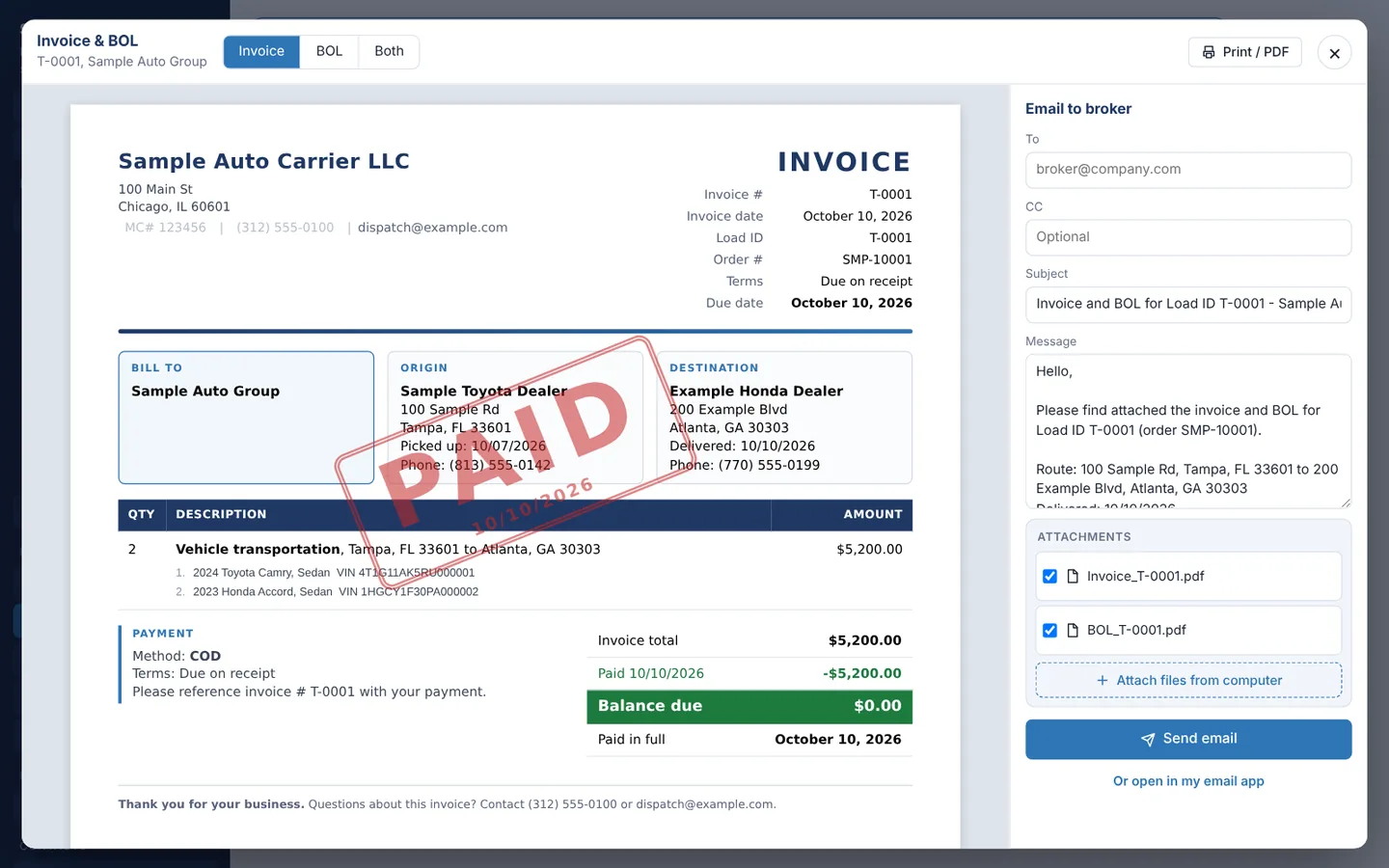
No more retyping loads into an invoice template
Everything on the invoice already lives in the load: broker, order number, vehicles, VINs, pickup and delivery, price and payment terms. Dispatch Autopilot puts it on a clean invoice and a matching bill of lading, ready to send.
What you get
- Invoice and BOL together or separately, as PDFs, with inspection photos on extra BOL pages if you want them.
- One-tap email to the broker with your W-9, insurance certificate or authority letter attached automatically.
- Payment instructions on every invoice, including Zelle details, remit-to address or your factoring company.
- Payment tracking: billed loads count down the broker’s payment terms in business days and turn past due when they run out.
- Email log: see what was sent, to whom and when.
- Partial payments: record what the broker paid so far. The rest stays due and the load moves to past due until it is paid, with a note of why it was short.
- Quick pay, wire and ACH fees: record the payment, then add the fee as a percent of the invoice, a percent of that payment, or a dollar amount. The invoice is paid in full and the fee comes off the gross before driver pay is figured. The driver sees it on the settlement, so they know why the load paid less.
- Payments on every load: one clean list of every payment, fee and short pay, with who recorded it and when, plus the balance. Edit or remove any payment, add quick pay, wire or ACH fees on their own, or mark a load unpaid if it was recorded by mistake.
- PAID stamp: paid invoices show a PAID stamp and a zero balance; partly paid ones show PARTIALLY PAID and the balance due.
Need a blank form for a one-off job? Use our free car hauler invoice template and BOL template, and read how to fill out a car hauler BOL.
Questions
Can I put my own invoice numbers on invoices?
Yes. Set an invoice number prefix in Settings, or type a custom invoice number on a load.
Can I record a quick pay fee or a partial payment?
Yes. Record what the broker paid, full or partial, then add the quick pay, wire or ACH fee as a percent of the invoice, a percent of that payment, or a dollar amount. Partly paid loads stay open with the balance due and move to past due until the rest arrives.
Can I show Zelle on the invoice?
Yes. Add your Zelle name and phone number or email in Settings > Invoices and choose whether it prints on every invoice or only on loads paid by Zelle.
Run your car hauling business on autopilot
Loads, trips, inspections, invoices and driver pay in one app. Try every feature free for 15 days. No credit card needed.
Start free trial